conkw documentation - FileGrabber
This is the file grabber. The way it works is that it reads a file and expose the metrics it found in the file through the API. In other words, it's up to you to write scripts and programs that write data to file(s) and then automatically you can use those metrics in conkw.
- Full name:
net.pieroxy.conkw.webapp.grabbers.FileGrabber - Default instance name:
file
Use cases
- You want to let external programs / computers push their metrics into a file that your instance will monitor.
- You have a program in your crontab that writes metrics to a file and you want to monitor them.
File format
- The files imported must abide by the properties format.
- You can read more about the file format on wikipedia.
- To make it simple, each line must be of the form
key=valueorkey:value. - Each value whose key starting with
str_will be stored in the string space. - Each value whose key starting with
num_will be parsed and stored as a number. - The metrics keys generated are stripped of their prefixes.
- key/values pairs whose key doesn't start with one of the two prefixes will be ignored.
Example (live from my system)
num_temp_CPU: 35.0
num_temp_core0: 33.0
num_temp_core1: 33.0
temp1: 27.8
SYSTIN: 26.0
num_temp_mobo_cpu: 15.5
 (crit = 84.8
Sensor 1: 31.9
Sensor 2: 30.9
num_rpm_fan1_input: 851.000
num_rpm_fan2_input: 335.000
num_rpm_fan4_input: 770.000
num_temp_hdd_home : 32
num_temp_hdd_home2 : 31
str_displaystate: on
This file fed to FileGrabber will result in the following metrics:
num.temp_CPU: 35num.temp_core0: 33num.temp_core1: 33num.temp_mobo_cpu: 15.5num.rpm_fan1_input: 851num.rpm_fan2_input: 335num.rpm_fan4_input: 770num.temp_hdd_home: 32num.temp_hdd_home2: 31str.displaystate: "on"
Performance and refresh rate
The files are parsed at program startup, then each second, if their last modified time changed, they will be parsed again, otherwise the cached version will be used.
Note: You can use several instances of this grabber in order to grab more than one file. Do that by making it appear several times in the config file. You will have to choose a different name for each instance.
Configuration
    {
      "implementation":"net.pieroxy.conkw.webapp.grabbers.FileGrabber",
      "name":"mygrabber",
      "config": {
        "file":"/tmp/somefile.txt"
      }
    },
The simplest thing here: Only specify the name of the file to grab, and you're set!
Real world use case
Here is an example of usage on a Linux machine.
Let's say I want to monitor Slack's status to be aware of when there is an issue on their service. First of all, Slack exposes an API to know such things: https://status.slack.com/api/v2.0.0/current
Getting data from the API
Calling this URL returns some unformatted JSON:
{"status":"ok","date_created":"2021-06-04T18:19:40-07:00","date_updated":"2021-06-04T18:19:40-07:00","active_incidents":[]}
We will want to format this properly with jq . :
$ curl https://status.slack.com/api/v2.0.0/current | jq .
{
  "status": "ok",
  "date_created": "2021-06-04T18:19:40-07:00",
  "date_updated": "2021-06-04T18:19:40-07:00",
  "active_incidents": []
}
$
Only the status line is of interest for us here :
$ curl https://status.slack.com/api/v2.0.0/current | jq . | head -3 | grep status
  "status": "ok",
$
Now, this is not exactly in the proper format. Too many spaces, double quotes and final comma, plus the name doesn't start with "str_".
$ curl https://status.slack.com/api/v2.0.0/current | jq . | head -3 | grep status | sed -e 's/[", ]//g' -e 's/^/str_slack_/'
str_slack_status:ok
$
Now that's exactly what we want! Let's work with this.
Make it work automatically
You will need a few things. First, let's build a small script that will handle the grabbing for us, we will call it grab.sh:
TMPF=/tmp/mon.min.txt.tmp
rm -f $TMPF

curl https://status.slack.com/api/v2.0.0/current | jq . | head -3 | grep status | sed -e 's/[", ]//g' -e 's/^/str_slack_/' >> $TMPF

# Here you might want to gather some more data in the file.


mv $TMPF /tmp/monitoring.txt
Now, we need a grabber instance that will gather that for us:
    {
      "implementation":"net.pieroxy.conkw.webapp.grabbers.FileGrabber",
      "name":"webservices",
      "parameters": {
        "file":"/tmp/monitoring.txt"
      }
    },
Last, we need to execute the script on a regular basis, for example every minute. Let's add the following line to the crontab:
* * * * * /home/pieroxy/bin/scripts/grab.sh
And you're all set! As soon as slack will experience an issue, the value of the str_slack_status metric won't be "ok".
Display it in the UI
First of all, make sure the "webservices" grabber is required by your web page:
<body onload="ConkW.init()" cw-grabbers="...,webservices,...">
Then you can now put an element like the one below in your page:
  <label><a target="_blank" href="https://status.slack.com/">Slack</a> : </label>
  <cw-label cw-ns="webservices" cw-value="m:str::slack_status" cw-warn="m:str:isnot.ok:slack_status"></cw-label>
Where:
- The
atag allows the user to get quickly to the status page to get details. - The
cw-labelwill display whatever word was in the JSON from Slack's API, mostly "ok". - The
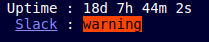
cw-labelwill have the classcw-erroradded to it whenever Slack'a API answers something other than "ok". By default, it will show up in red.
Screenshots:
- Slack is ok:

- Slack experiences an issue: