conkw documentation - SpotifyGrabber
This is the Spotify grabber. It relies on the spotify APIs to gather the currently playing song and album to report on the Conkw UI. You also can perform basic actions, such as play/pause/next/prev right from the UI.
- Full name:
net.pieroxy.conkw.webapp.grabbers.spotify.SpotifyGrabber - Default instance name:
spotify
Use cases
- You want details of the current running song on your dashboard (artist, time, cover art, track name, etc)
Usage
In order to use it, you need to:
- Open a browser and log into the spotify dev site
- Go to the dashboard
- Click on "Create an app"
- Give it a name and a description.
- On the app page, grab the "Client ID" and the "Client Secret" and paste them into conkw's config portion (see below).
- Click on "Edit Settings" and add a "Redirect URIs". This is the URL of your conkw instance's SpotifyGrabber default UI. For example,
http://localhost:12789/grabbersReference/spotify.html. - Note that this URL does not need to be accessible through the internet, but it will need to be accessible from the browser that will first connect conkw with your Spotify account.
- You can easily hardcode your internal IP address, your host name or anything else in there.
- In your configuration, add the same URL, down to the last character.
This is all you have to do on the spotify website. Now:
- Now, you can open the reference UI for the SpotifyGrabber.
- You will notice one error, in red. Click on it.
- Click on the
please loginlink. - You then need to login to Spotify, if your browser is not already logged in.
- Click on Accept to authorize your instance of conkw to access your spotify account.
- You should be back to the spotify default UI. If you are playing music you will see it. If not, just hit play on spotify and watch.
Note: Here is below the default config portion for the SpotifyGrabber:
"config": {
  "clientId":"Your client id",
  "clientSecret":"Your client secret",
  "redirectUri":"Your redirect URI"
}
Metrics
num.len: The length of the current track, in seconds.num.pos: The position ni the current track, in seconds.str.album_art: The URL of the current album playing.str.album_artist: The artist of the current track playing.str.album_date: The album release date.str.album_name: The name of the album playing.str.album_tracks: The total number of tracks in the album.str.islocal:"true"if the track is a local filestr.status: The status of the player. Known statuses are"Playing","Paused"and not present if nothing is playing.str.trackname: The name of the track currently playing or paused.str.tracknum: The number of the track playing in relation to the album.
Default UI
Here is how the default UI looks like:
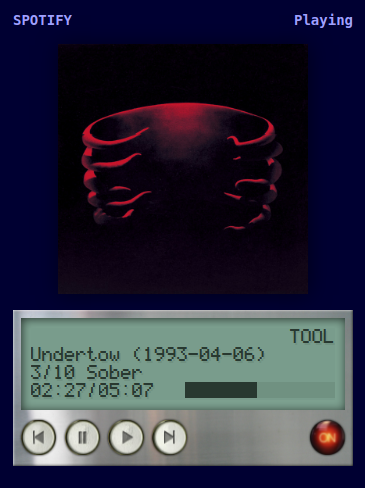
Of course, the four buttons are operational. You can go next, previous, pause and restart the music directly from the UI.
While this is the default style, you can imagine anything you want really. The world is your oyster. If you know a bit of HTML, JavaScript and CSS, you can make the UI looks exactly as you want.