conkw documentation - Built-in UI available styles
This documentation is about guidelines on the default UIs. To get to the bottom of everything, press F12 and inspect the default UIs.
Color set
The default conkw UI uses a set of colors that is dark. Whether it's daytime of nighttime, I feel that's the best theme.
- The background color is
#000032 - The text color is white
- The error background color is
#f40 - The stale text color is
#888 - The gauge default color is
#adffad - The gauge in a warning state is of the color
#800000
As an example:
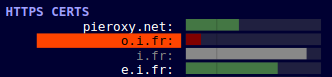
pieroxy.netis a regular label- The
pieroxy.netgauge is a regular gauge. Its color (the default color) is green. o.i.fris a "warning" label- The
o.i.frgauge is a gauge in the warning state. Its color is red. i.fris a stale metric.- The
i.frgauge is a gauge in the stale state. Its color is grey.
You might want to include your own CSS in your UI files and override one or many of these default styles. If you do, make sure the error and stale states are still easy to identify for the user looking at the dashboard. Looking at a UI that has no data anymore doesn't have a lot of value. The stale state if here to make sure you are aware some values are not present. The error state is also important for the user to be able to witness and detect.
Columns based layout
The default UI uses a column-based approach. Every basic component is displayed in a few lines and is laid out as an element in a column-based page. Each column is 350px in width and elements flow freely as long as there's enough room for them. When there's not room for them anymore, the whole page will be zoomed out until the elements can fit in it again. This approach will add columns when needed.
A perfect example for this is the OSHI default UI. CLick on the "detailed view" to see a lot of stuff in your screen.
We feel this is the best approach for a dashboard that is meant to be always displayed on an external screen that you don't necessarily have a keyboard and/or mouse attached to. Everything is visible and if you want details, you can always open it in some other browser. After all, it's web based.
You can add a cw-options="noresize" attribute to your body html tag to disable this behavior.
Again, those are choices made by default. You can override them.
Wrap up
All in all, look at the default grabbers UI to see what the default UI is capable of and its various components. Feel free to copy/paste from those UIs into your own. That's part of whey they're here for.
Now, if you want something more, or something different, you're in a browser, just write whatever you want. You can override style in your own stylesheets and as long as you stick with the same HTML snippets you can use the default components.